GTK4 & Libadwaita Rust 2024 + Tokio + SQLx GtkSourceView 5 Vim Modal PostgreSQL & MySQL / MariaDB

Native Linux Database Client.
Built for Speed, GNOME & Vim.

DBased is a lightweight, native GTK4 & Libadwaita client for PostgreSQL and MySQL / MariaDB. Zero Electron bloat—just an async sqlx spreadsheet grid, built-in russh bastion tunneling, foreign-key quick jumps, and Vim-enabled SQL & JSONB editors.

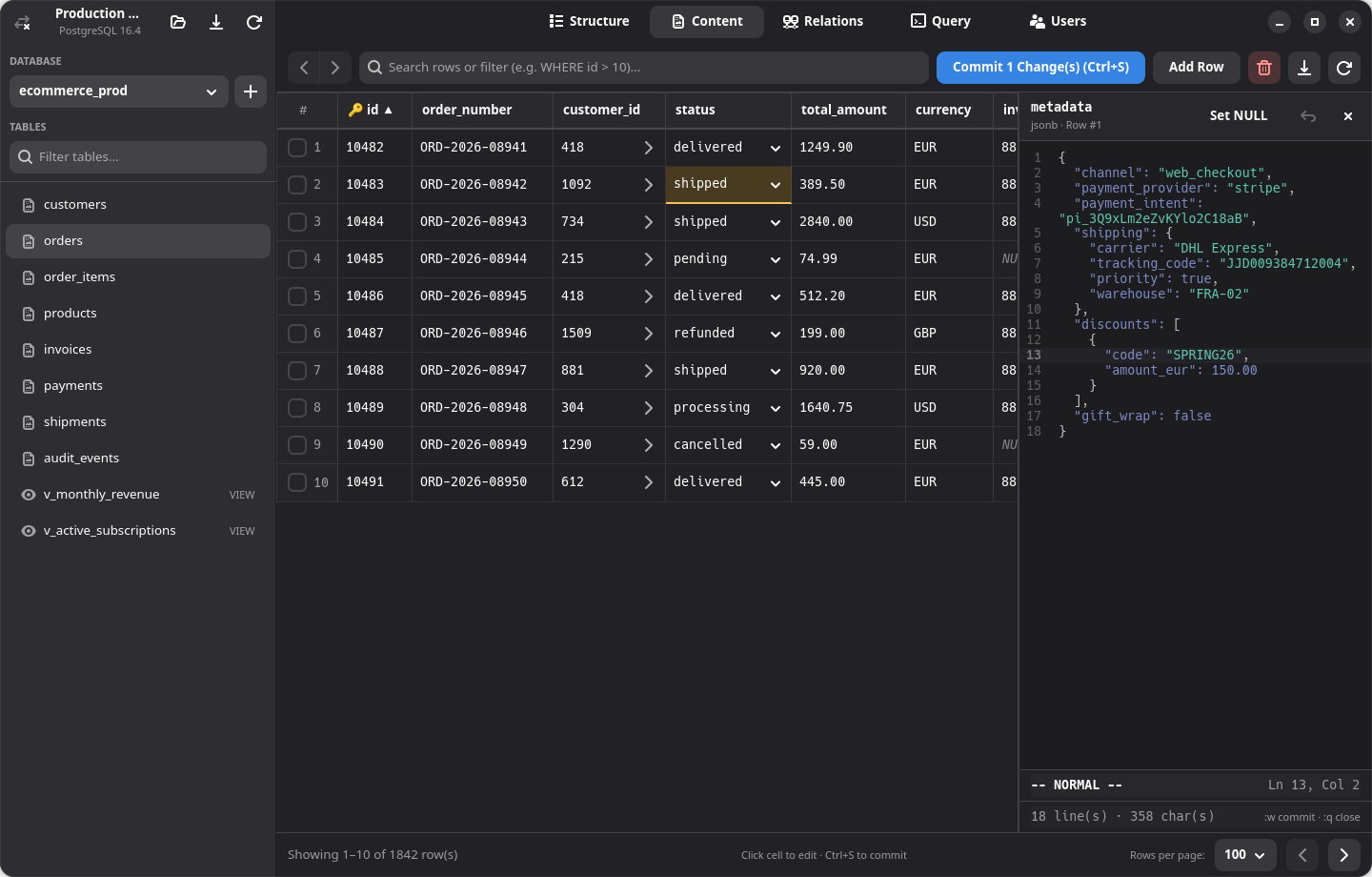
DBased Table Content View and Multiline JSONB Vim Editor Click image to enlarge · Press 1–6 to switch tabs
Content View

Spreadsheet Data Grid, Inline ENUMs & Multiline JSONB Vim Inspector

Browse and filter rows at native speed, edit cells inline (including native ENUM dropdown selectors) with transactional batch commits, jump across foreign keys (>), and inspect JSON/JSONB/XML/TEXT columns in a side-by-side GtkSourceView 5 Vim panel.

Ctrl+S Commit batch edits :w Stage JSONB cell :wq Stage & close panel Alt+← FK jump back
Engineered in Rust

Everything you need in a database workspace. Zero webview lag.

Designed around GNOME Human Interface Guidelines and keyboard-first workflows, DBased runs queries and SSH tunnels on a dedicated Tokio worker pool so the UI stays locked at native frame rates.

Spreadsheet Grid, Inline ENUMs & FK Jumps

Auto-fitted resizable columns, single-click sorting, inline cell editing with native ENUM dropdowns, and transactional batch commits (Ctrl+S). Click > in any foreign-key cell to jump to the parent row with full Alt+Left / Alt+Right history.

Ctrl+S Batch Commit ENUM Dropdowns FK Navigation

Dual Vim-Powered Editors

First-class GtkSourceView 5 Vim emulation in both the SQL Query Editor and the side-by-side Multiline Cell Inspector for JSON, JSONB, XML, and TEXT payloads. Use :w, :q, :wq, and :r without leaving the home row.

NORMAL / INSERT / VISUAL GtkSourceView 5.10

Built-in SSH Bastion Tunneling

Connect through encrypted SSH jump hosts directly inside DBased without external terminal wrappers. Powered by pure-Rust russh with support for both Password and Private Key authentication plus JSON bookmark import/export.

russh 0.49 Ed25519 / RSA Keys Bookmark Sync

Schema, Indexes & Column Reordering

Add, modify, or drop columns and indexes (BTREE, GIN, UNIQUE, HASH) via guided dialogs, and drag rows to reorder columns—using native ALTER TABLE on MySQL and a transactional rebuild preserving FKs, indexes, and views on PostgreSQL.

Indexes Panel Drag-and-Drop Columns

Users & Per-Database Permissions

Manage PostgreSQL roles and MySQL/MariaDB accounts from a dedicated workspace view. Create or drop users, rotate passwords, toggle Superuser and Can Login attributes, and grant or revoke per-database READ, READ + WRITE, or ALL PRIVILEGES.

Role & Account CRUD Per-DB ACL Grants

Database Import, Export & Async Drivers

Powered by sqlx with runtime-tokio-rustls. Create new databases with custom encoding/collations, import .sql scripts directly from the sidebar, or export full databases and tables to SQL, CSV, or JSON.

SQL / CSV / JSON Export sqlx 0.8 + tokio
SQL Query Editor & Visual Selection Execution GtkSourceView 5 · Vim
-- Execute full buffer or active VISUAL selection (Ctrl+Enter or :r)
SELECT
  c.email,
  c.full_name,
  COUNT(o.id) AS total_orders,
  SUM(o.total_eur) AS lifetime_revenue_eur
FROM customers c
JOIN orders o ON o.customer_id = c.id
WHERE o.status IN ('shipped', 'delivered')
GROUP BY c.id, c.email, c.full_name
ORDER BY lifetime_revenue_eur DESC
LIMIT 6;
-- NORMAL -- Query Results — 6 row(s) returned in 4 ms · :r run · :w save
Dual-Mode Content Filter Bar Free-Text & Raw WHERE
-- Mode 1: Type any search term to filter across all columns
-- Automatically expands to CAST(col AS TEXT) ILIKE '%Berlin%'
Berlin

-- Mode 2: Prefix with WHERE for custom SQL predicates
WHERE total_eur > 100 AND status = 'shipped'

-- Side-by-Side JSONB Cell Inspector (:wq to stage & close)
{
  "carrier": "DHL Express",
  "priority": "express_24h",
  "insured": true
}
:wq Stages cell as dirty · Commit all staged rows in a transaction with Ctrl+S
Installation & Packages

Native packages for every Linux distribution.

Download prebuilt release artifacts from GitHub Releases or build directly from source with Cargo and Make.

Arch Linux Package

Built natively with makepkg against system gtk4, libadwaita, and gtksourceview5.

  • Artifactdbased-*-x86_64.pkg.tar.zst
  • Architecturex86_64, aarch64 (PKGBUILD)
  • Runtime Depsgtk4, libadwaita, gtksourceview5
Download from GitHub Releases
Option 1 — Install prebuilt Arch package from Releases
sudo pacman -U dbased-*-x86_64.pkg.tar.zst
Option 2 — Build & install via included PKGBUILD
git clone https://github.com/tsndr/dbased.git
cd dbased
make install-arch   # or: makepkg -sfi

Debian & Ubuntu (.deb)

Packaged with cargo-deb on Ubuntu 24.04 LTS (GTK 4.14, Libadwaita 1.5) with automatic shared library dependency resolution.

  • Artifactdbased_*_amd64.deb
  • Sectiondatabase
  • IncludesBinary, .desktop, SVG Icon, AppStream
Download .deb from Releases
Install Debian / Ubuntu (.deb) package
sudo apt install ./dbased_*_amd64.deb
Development libraries (if building from source on Ubuntu / Debian)
sudo apt install build-essential cargo rustc pkg-config \
  libgtk-4-dev libadwaita-1-dev libgtksourceview-5-dev

Fedora & RHEL (.rpm)

Built with rpmbuild on Fedora 41 with full desktop launcher, scalable icon, and AppStream metadata integration.

  • Artifactdbased-*-1.x86_64.rpm
  • Requiresgtk4, libadwaita, gtksourceview5
  • LicenseMIT
Download .rpm from Releases
Install Fedora / RHEL (.rpm) package
sudo dnf install ./dbased-*.x86_64.rpm
Development libraries (if building from source on Fedora)
sudo dnf install cargo rust gtk4-devel libadwaita-devel gtksourceview5-devel

Flatpak Bundle

Built against org.gnome.Platform//47 with Wayland/X11 sockets, read-only ~/.ssh key access, and org.freedesktop.secrets keyring integration.

  • App IDdev.tsndr.dbased
  • Runtimeorg.gnome.Platform // 47
  • Manifestdata/dev.tsndr.dbased.flatpak.yml
Download .flatpak from Releases
Install single-file Flatpak bundle
flatpak install --user ./dbased-*-x86_64.flatpak
Run via Flatpak
flatpak run dev.tsndr.dbased

Portable Linux Formats

Run DBased anywhere without package manager installation using the self-contained GTK4 AppImage, or install the stripped release binary tarball directly.

  • AppImagedbased-*-x86_64.AppImage
  • Tarballdbased-*-linux-x86_64.tar.gz
  • ChecksumsSHA256SUMS included in release
View All Release Assets
Run portable AppImage
chmod +x dbased-*-x86_64.AppImage && ./dbased-*-x86_64.AppImage
Install from Generic Linux Tarball (.tar.gz)
tar -xzf dbased-*-linux-x86_64.tar.gz && cd dbased-* && sudo make install-files

Building from Source

Requires a stable Rust toolchain supporting the Rust 2024 edition (rustc >= 1.85) along with GTK 4.14+, Libadwaita 1.5+, and GtkSourceView 5.10+ headers.

  • EditionRust 2024 (rustc >= 1.85)
  • Direct Runcargo run --release
  • Debug LogsRUST_LOG=dbased=debug
Browse Source Repository
System-wide installation (/usr/local)
git clone https://github.com/tsndr/dbased.git
cd dbased
make build
sudo make install
User-local installation (~/.local, no root required)
make install-user   # Uninstall anytime with: make uninstall-user
Keyboard-Centric Flow

Shortcuts & Vim Command Reference

Every core action in DBased—from staging multiline JSONB edits to jumping across foreign keys and running visual SQL selections—is mapped for fast keyboard navigation.

Content Grid & Navigation

Spreadsheet
  • Commit all staged cell edits (transaction) Ctrl+S
  • Jump to referenced parent row in FK cell Click >
  • Navigate back in FK jump history Alt+Left
  • Navigate forward in FK jump history Alt+Right
  • Mouse back / forward history buttons Mouse Back / Fwd
  • Apply custom SQL predicate in filter bar WHERE ...

Multiline Cell Inspector

Vim Modal
  • Open side-by-side JSON/JSONB/TEXT panel Expand Icon
  • Stage buffer edits & mark cell dirty :w/:write
  • Close multiline editor panel :q/:quit
  • Stage buffer edits & close panel :wq/:x
  • Modal editing motions & text objects NORMALVISUAL

SQL Query Editor

Vim Modal
  • Execute visual selection or full buffer Ctrl+Enter
  • Execute query from Vim command line :r/:run
  • Save SQL buffer to .sql file :w/:write
  • Select query block for partial execution v/V
  • Export query result set CSV/JSON
Configuration & Security

OS Keyring Integration & Clean XDG Storage

Connection metadata and sensitive credentials are separated cleanly following Linux desktop standards.

D-Bus Secret Service Keyring

Database passwords and SSH passphrases are stored securely in your system keyring via the D-Bus Secret Service API (oo7), compatible out of the box with GNOME Keyring, KeePassXC, and KWallet.

XDG Bookmarks & 0600 Fallback

Non-sensitive connection profiles live in ~/.config/dbased/bookmarks.toml. In headless or minimal setups without a D-Bus Secret Service provider, DBased automatically falls back to ~/.config/dbased/.credentials.toml with strict 0600 permissions.

Lightweight Native Footprint

Compiled to a single native binary (~5 MB package size) with Wayland and X11 support via GTK4 and Libadwaita. Control runtime diagnostics anytime via RUST_LOG=dbased=debug.